ARGUS Benchmark Manager July 2026
Summary
This release brings a powerful new comparison capability, greater market flexibility, and greater transparency to Benchmark Manager. Compare any portfolio against a new benchmark built from your entire organization, select the CBSAs that matter at sector level and view your exposure across 50+ US markets, and classify your models more precisely with editable property types - all with greater transparency over benchmark versioning and faster performance.
Key highlights
What's new
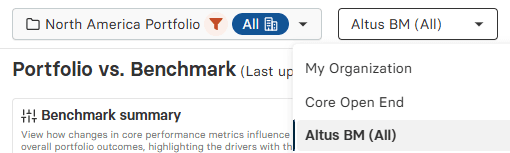
New "My organization" pre-filtered benchmark - A new pre-filtered benchmark, My organization, is now available in the selection dropdown. It is built from all the models that are part of your organization, letting you compare a specific portfolio against your full organizational footprint. It joins the existing pre-filtered benchmarks (Altus BM (All) and Core Open End).
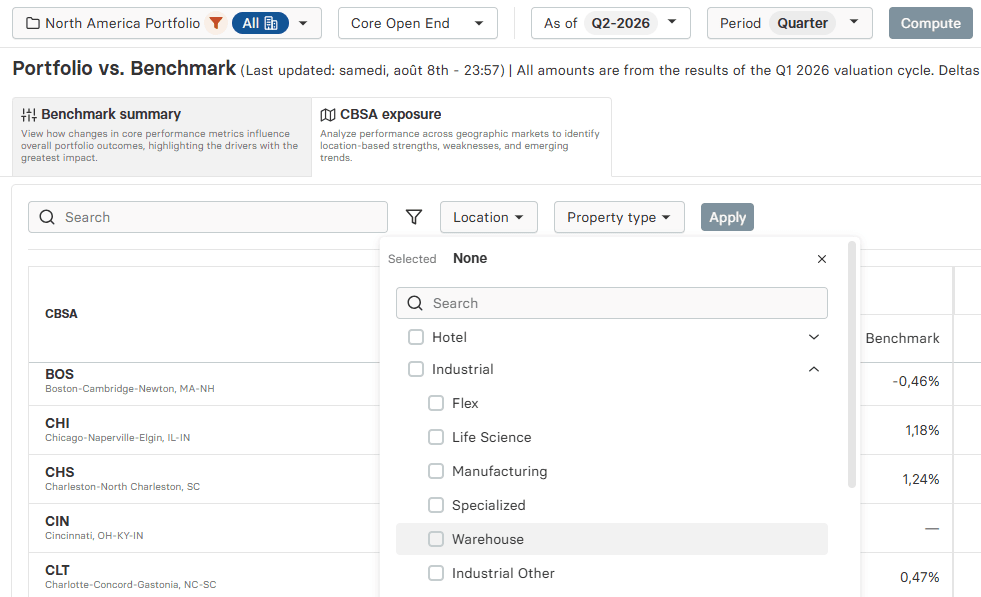
CBSA selection and CBSA Exposure - You can now select the CBSAs (Core-Based Statistical Areas) that matter at sector level, so you can focus your analysis on the markets most relevant to each part of your portfolio, with the calculation engine optimized for faster performance. A new dedicated CBSA Exposure analysis displays all 50+ CBSAs, giving you a clear view of how your portfolio is distributed across markets.
Editable property types and sub-types - Property types and sub-types are now editable, giving you greater flexibility to classify your models and align them more precisely with the benchmarks you compare against.
Publication / update date in the UI - A publication date is now displayed in two places: on your dashboard and in the Benchmark selection dropdown. This date updates automatically each time a benchmark is modified or a new version is published to replace the current one, so you can always see which version you are working with.
What this means for you
Benchmark against your own organization: Measure a portfolio's relative performance against the full breadth of your organization's models, identifying where it leads or lags and where there is room to optimize.
Focus on the CBSAs that matter: With sector-level CBSA selection and exposure across 50+ US markets, you can concentrate your analysis where it counts and get results back faster - keeping your analysis moving at the pace of your decisions.
Align your models with the right benchmarks: Editable property types and sub-types let you classify assets more accurately, so your comparisons are made against the most relevant benchmark and your relative performance insight is more precise.
Always know which version you're working with: The publication date removes ambiguity when benchmark figures change, so you can trust that movements reflect a genuine data update rather than an error - and explain those changes with confidence to investors and stakeholders.
Explore these enhancements now in ARGUS Intelligence
Visit the Altus support community
Get technical, software and licence support from the community. Ask questions, give answers, submit suggestions and learn more about your software solutions – with your commercial real estate colleagues.