All ARGUS Enterprise (AE) admin settings are in ARGUS Intelligence Platform
Summary
ARGUS Enterprise administrators can now view and manage their ARGUS Enterprise version and calculation version from a new AE Settings tab in ARGUS Intelligence. It gives you one place to check your current versions and keep your environment up to date.
As a reminder, ARGUS Enterprise is now part of ARGUS Intelligence Platform.
What's new
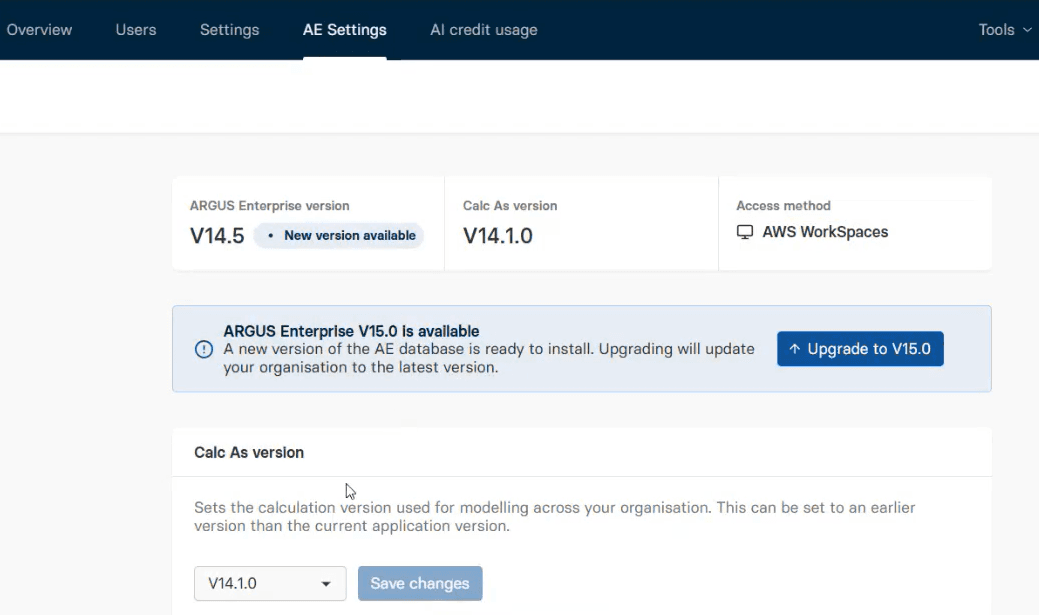
AE Settings in Admin settings A new tab, available to Org admins with an active ARGUS Enterprise subscription, shows your current ARGUS Enterprise version and calculation version, and displays your access method for reference.
ARGUS Enterprise upgrade from ARGUS Intelligence When a newer ARGUS Enterprise version is available, administrators can start the upgrade directly from AE Settings.
Calculation version selection When a newer calculation version is available, administrators can select and save it in just a few clicks. Once you are on the latest version, the selection is no longer displayed.
What this means for you
One consistent experience: Administrators can manage ARGUS Enterprise settings from one place.
Get started: Sign in to ARGUS Intelligence and go to Admin > AE Settings
Visit the Altus support community
Get technical, software and licence support from the community. Ask questions, give answers, submit suggestions and learn more about your software solutions – with your commercial real estate colleagues.
Product releases