ARGUS ENTERPRISE - 2026 PLATFORM UPDATES
Key updates coming to your ARGUS Enterprise account
We're unifying ARGUS Enterprise and ARGUS Intelligence Platform into a single experience - more simpler to manage, more secure, and more consistent across your Altus products.
What you need to do - and when
Find your situation in the table below, then select the relevant tab for full details and step-by-step guidance.
Your situation | Action required | Deadline | Urgency |
|---|---|---|---|
You manage AE user accounts | Verify admin access in ARGUS Intelligence Platform | Before May 2026 | Action needed |
ARGUS Enterprise is installed on your computer | Install the latest version and switch to ARGUS Intelligence Platform authentication | Final deadline: January 2027 | Act from May 2026 |
You access ARGUS Enterprise via ARGUS Cloud | Verify ARGUS Intelligence Platform access; begin using browser launch by September 2026 | By early January 2027 | Action needed |
You are on ARGUS Enterprise version 13 | Update before access through ARGUS Cloud disappears (Support ended 15 May 2026) | Product will be removed from ARGUS Cloud by 31 December 2026 | Urgent |
Step-by-step guidance for your situation
Select the tab that matches how you currently use ARGUS Enterprise.
This section is for you if: you currently manage user accounts or control access permissions for ARGUS Enterprise within your organisation.
Starting May 2026, user administration for ARGUS Enterprise moves into ARGUS Intelligence Platform.
You'll manage all provisioning and access from one place.
What's changing
Administration tasks such as user provisioning and access control will move into ARGUS Intelligence Platform. New roles will appear there, aligned with your existing ARGUS Cloud roles. Your existing users and their data are unaffected - this change is only to where you manage them.
Your users will not notice any change. They will continue to access ARGUS Enterprise as they do today.
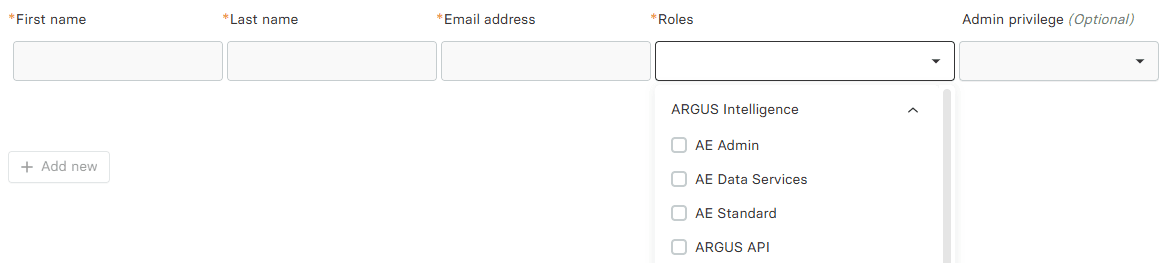
Steps to complete before May 2026
Step 1 - Verify your own administrator access
Log in to ARGUS Intelligence Platform and confirm you can see the user management section and that your user list is visible.
Step 2 - Verify your co-administrators' access
Ensure all AE user administrators have the correct role assigned (Admin Privilege = Org Admin or User Admin) and can log in to ARGUS Intelligence Platform.
Step 3 - Resolve any administration issues
If any user administrator is missing access, contact support before the transition date - chat with our team or raise a case.
If any users can't see their assets or models after the transition
Your users are already in ARGUS Intelligence Platform with an ARGUS Asset Manager role. If they cannot view their assets, properties, or models, you may need to:
This section is for you if: ARGUS Enterprise is installed directly on a computer and users open it from the Windows Start menu or a desktop shortcut. This may involve two people - an IT administrator who manages software installations, and the end user who connects to the database and accesses their data. Both need to complete separate steps.

From January 2027, ARGUS Intelligence Platform authentication will be mandatory to connect to the database from ARGUS Enterprise.
Without it, users will not be able to access their data. We recommend both IT and end users complete their steps by June 2026 to allow time to resolve any issues before the deadline.
What's changing
Today
Separate login for ARGUS Enterprise
Older authentication technology
Beginning January 2027
Single login shared with ARGUS Intelligence Platform
Stronger, unified security
Same application, same data, same workflows
Data, workflows, and the day-to-day experience in ARGUS Enterprise remain exactly the same.
Timeline
Date | What happens | IT administrator | End user |
|---|---|---|---|
May 2026 | Updated Remote Client available for AE 14 and AE 15 | Recommended window to act. Plan and deploy AE 14.5.0.930 or AE 15.0.1.1170 to all affected machines. | No action yet - wait for IT to complete the installation. |
May – June 2026 | Transition window open - both authentication methods work | Confirm installation is complete and communicate to end users that they can now switch. | Recommended window to act. Once IT confirms the update is installed, switch to ARGUS Intelligence Platform authentication. Takes under a minute. |
June 2026 – January 2027 | Both authentication methods still work | Chase any outstanding installations. Support demand will increase closer to the deadline. | If you haven't switched yet, do so now. Contact IT if the latest version is not yet installed on your machine. |
January 2027 | ARGUS Intelligence Platform authentication mandatory to connect to the database | AE 14.5.0.930 or AE 15.0.1.1170 must be installed on all machines before this date. | Without switching, you will not be able to access your data. An ARGUS Intelligence Platform Connection must be in place. |
Guides:
Different steps are needed depending on your role.
For IT administrators
For end users
This section is for you if: you access ARGUS Enterprise by logging into the ARGUS Cloud portal and clicking a link to launch the application via Citrix Workspace.
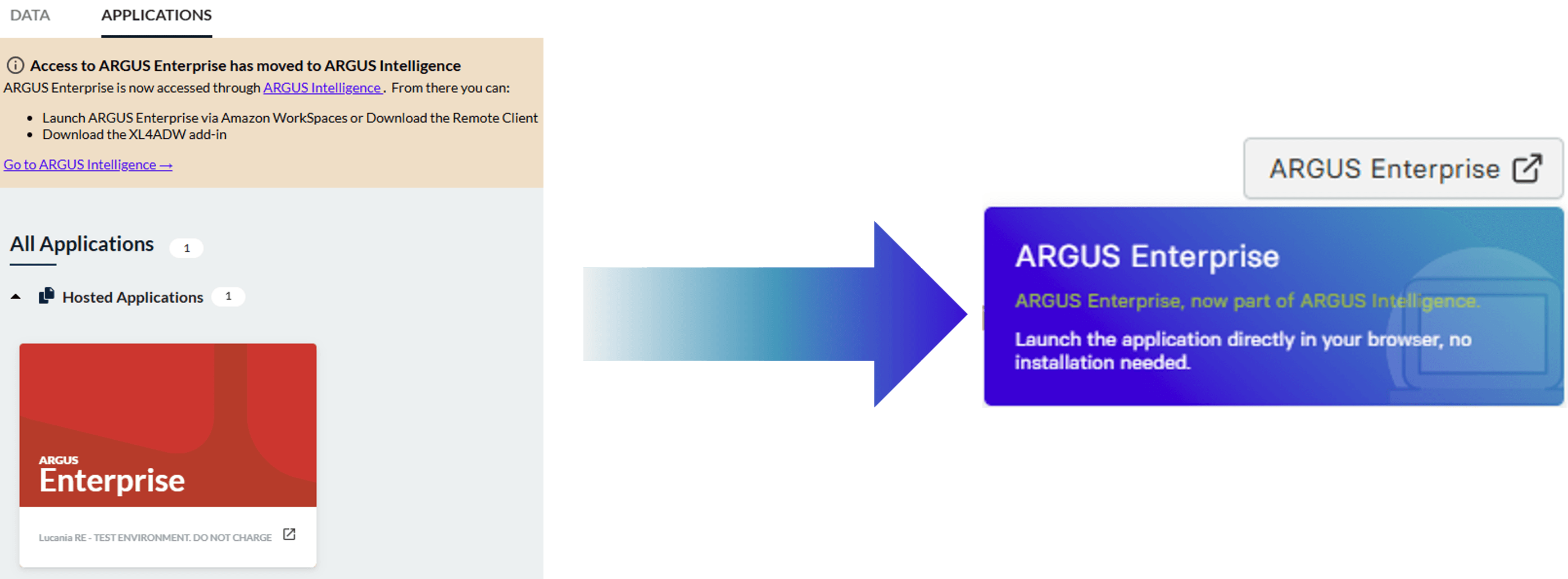
Citrix ends early January 2027. From that point, ARGUS Enterprise will be launched directly from ARGUS Intelligence Platform in your browser - no Citrix app required.
We recommend switching as soon as browser access becomes available in September 2026, so we can resolve any concerns prior to the dissolution of our Citrix use.
Why this is changing
Citrix has been used for years to stream ARGUS Enterprise remotely, but it requires a dedicated desktop app and ongoing IT maintenance. We're replacing it with Amazon Workspace Applications - the same remote streaming, but running entirely in the cloud and accessible directly from any browser. Nothing to install, nothing to maintain.
And the new experience is significantly simpler. Instead of logging into ARGUS Cloud and navigating to a Citrix launch link, there will be a single button to launch ARGUS Enterprise directly on the ARGUS Intelligence Platform homepage. One click, and you're in.
This change also brings ARGUS Enterprise and ARGUS Intelligence Platform closer together - your asset-level models will soon connect directly to your portfolio analytics without switching between systems.
Timeline
Date | What happens | Action needed |
|---|---|---|
Before September 2026 | ARGUS Enterprise continues to launch via Citrix from the ARGUS Cloud portal | Log in to ARGUS Intelligence Platform and confirm you can access ARGUS Enterprise through the portal |
September 2026 | Browser-based access becomes available - ARGUS Enterprise launches directly from ARGUS Intelligence, with no Citrix app needed | Begin launching ARGUS Enterprise via ARGUS Intelligence Platform. Use this window to get comfortable with the new method before Citrix is retired. |
By early January 2027 | Citrix access ends | ARGUS Intelligence Platform (browser) becomes the only way to launch ARGUS Enterprise. The ARGUS Cloud portal will remain accessible but can no longer be used to launch the application. |
How to open your property models
Log in to ARGUS Intelligence.
Search the Asset/Property in the list, select the model you want, and open it directly in the ARGUS Enterprise model editor.
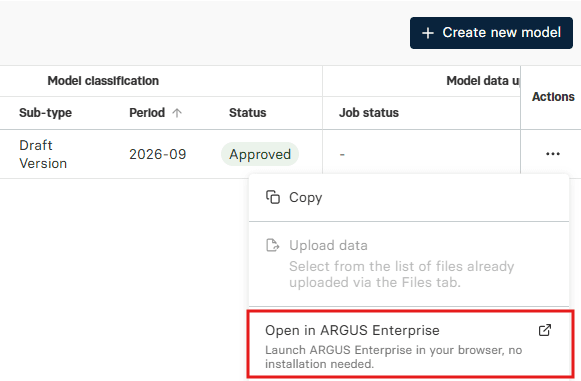
ARGUS Intelligence opens that property model directly, in a new browser tab. No ARGUS Cloud portal, no Citrix launch link, no searching through folders.
How to open ARGUS Enterprise model editor
Log in to ARGUS Intelligence.
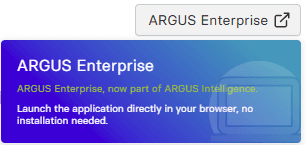
Click the “ARGUS Enterprise” button on your homepage.
ARGUS Intelligence opens it directly in a new browser tab. No ARGUS Cloud portal, no Citrix launch link.
What stays the same
Your data, models, workflows, and settings in ARGUS Enterprise are completely unchanged. Only the way you launch the application is different.
This section is for you if: your organisation is currently running ARGUS Enterprise version 13.
15 May 2026 - support ended for ARGUS Enterprise version 13.
Altus Group no longer provides technical support or fixes.
Product will be removed from ARGUS Cloud by 31 December 2026.
Beginning 1 January 2027, all access to ARGUS Enterprise version 13 on ARGUS Cloud will be permanently discontinued. This means that any data that has not been upgraded to ARGUS Enterprise version 14 or later will no longer be accessible until after upgrading.
What upgrading means for you
We recommend upgrading to ARGUS Intelligence Platform, which includes ARGUS Enterprise (version 14 or 15). Moving to a current version ensures you're working on the same platform as the broader commercial real estate market, and keeps your team eligible for support.
Upgrading from AE 13 also gives you access to everything introduced in AE 14.5.0.930 / AE 15.0.1.1170, including:
Continuity of service and ongoing technical support
Access to the latest analytics and reporting features in ARGUS Intelligence
Improved productivity and portfolio transparency
How to upgrade
Upgrades are managed with support from your account representative. Most upgrades are completed within a few weeks, so we encourage you to get in touch as soon as possible to avoid any gap in support coverage.
Contact the support team or your account representative to help you in this upgrade.
FAQ
FAQ on the transition
For Administrators user management migration
For Citrix to Amazon WorkSpaces Transition
For ARGUS Enterprise Remote Client