Bulk creation of assets and properties - and other enhancements
This release adds bulk creation of assets and properties in Asset Manager, letting administrators build out portfolios from a guided Excel template with a built-in review step and automatic address-based reconciliation.
Summary
Asset Manager introduces bulk creation of assets and properties. Asset Administrators can now build out portfolios in a single, template-driven workflow - downloading a guided Excel file, validating their data in a review step, and letting the platform reconcile new records against existing ones by address.
What's new
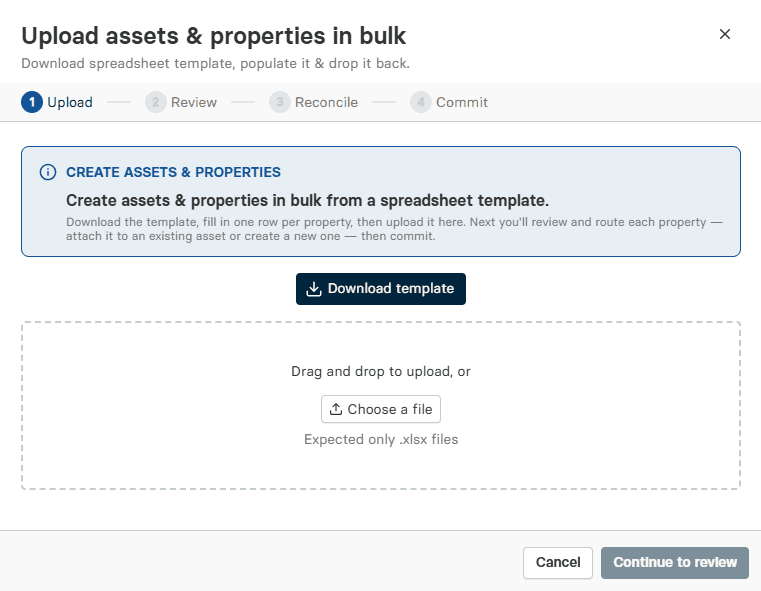
Bulk creation from one place: Create multiple assets and properties at once using the new "Create Assets and Properties" button in Asset Manager.
Guided Excel template: Download a template directly from the platform ("Download Template"). It includes built-in instructions for required and optional fields, so your data is structured correctly before import.
Review before you create: A dedicated review screen lets you validate your data before anything is created. Assign each property to an existing asset or create a new one - and, for VAS Admin users, flag assets as VAS Enabled or not. (nb: VAS is our Valuation Advisory Service; more info here: Commercial Real Estate Appraisal & Valuation Advisory Services)
Multiple properties under one asset: Assign multiple properties to a new or existing asset by using the same asset name.
Address-based reconciliation: New properties are automatically matched against existing ones by address. Because a property name must be unique at a single address, you decide whether to create a new property or update the existing record.
What this means for you
Faster portfolio onboarding: Stand up entire asset and property structures in one guided workflow instead of creating records one at a time.
Confidence in your data: The review step and address-based reconciliation help you catch duplicates and confirm assignments before anything is created.
Flexible asset structures: Group multiple properties under a single asset to reflect how your portfolio is actually organized.
Other enhancements
This release also includes several smaller improvements that make everyday work faster:
SOA Report in any currency: You can now view the SOA Report in any currency. The Summary of Assumptions (SOA) is also one of the reports delivered by our Valuation Advisory Services (VAS) team; learn more about Valuation Advisory Services[https://www.altusgroup.com/services/valuation-advisory/].
Sort by any column: Group assets by country, currency, or any other attribute to organize your view exactly how you need it.
Filter by attribute: Find the assets you need faster and cut the time spent searching.
Customizable columns: Choose which columns appear in your table to match your workflow and priorities.
Persistent table settings: On the asset list, your view is saved across sessions and browsers, so you return to the same setup every time.
Explore the feature in ARGUS Intelligence
Visit the Altus support community
Get technical, software and licence support from the community. Ask questions, give answers, submit suggestions and learn more about your software solutions – with your commercial real estate colleagues.