Altus Data Studio for Researchers
Stop reconciling data sources. Start analyzing the market.
Market researchers spend weeks manually consolidating data from fragmented sources. Data Studio brings sales, listings, development, and new homes data into one platform, so you start analyzing trends instead of organizing spreadsheets.
CRE sales and listings, development applications, and new homes data, in one platform
Data reviewed and maintained by local market experts, not just aggregated from public records
Consistent structure across markets: filter, compare, and export or pull via API without reformatting

The problem
Too much time gathering. Not enough time analyzing.
Most Canadian CRE research teams spend a significant portion of their time sourcing and reconciling data from multiple places, before any analysis begins. The output is only as reliable as the inputs.

Data from multiple sources rarely reconciles cleanly
Registry records, board data, and proprietary sources each use different geographies, classifications, and field definitions. Cross-referencing them manually before every report is time-consuming and introduces error.

Multi-market coverage is inconsistent
Data quality and availability varies significantly between Canadian markets. What you can reliably publish for Toronto may not hold for Calgary or Ottawa, making national or multi-market reports difficult to standardize.

Data currency is hard to verify
Registry lag, delayed board updates, and infrequent data refreshes make it difficult to know whether the data you're working from reflects current market conditions, a real risk when publishing externally.
How it helps researchers
Three capabilities that change how you work
Each one addresses a specific point in a researcher's workflow, from data assembly to published output.
01
All four data catalogs in one platform
Access commercial listings, sales transactions, development applications, and new homes data without switching sources. Data is structured consistently across markets, so filtering, comparing, and exporting doesn't require reformatting between sources.
Workflow moment
Report preparation and multi-market analysis, assembling inputs from a single source rather than reconciling multiple feeds
02
Transaction trends and market metrics
Filter sales activity by market, submarket, product type, and time period. Where available, transaction records include pricing metrics like cap rates and price per square foot, useful for tracking market movement over time and benchmarking performance across submarkets.
Workflow moment
Cap rate analysis, pricing trend reporting, and market absorption monitoring across Canadian markets
03
Development pipeline monitoring
Track development application activity in Greater Toronto and Greater Vancouver to understand what's in the pipeline, new projects submitted, under review, and approved. Useful for monitoring supply-side dynamics alongside transaction and leasing data.
Workflow moment
Supply-side analysis and development activity reporting, tracking what's coming to market before it's built
What the data covers
Four catalogs. One platform.
Each catalog covers a distinct layer of Canadian CRE market activity. A researcher can access all four, filter by market and time period, and export without leaving the platform.
Commercial Listings
Office and industrial properties: availability, vacancy, leasing activity, and asking rates across major Canadian provinces.
CRE Transactions
Commercial sales activity: transaction records with pricing detail, reviewed and maintained by local market experts.
Development Applications
Development application monitoring for Greater Toronto and Greater Vancouver. Track what's in the pipeline by submarket and project type.
New Homes Data
New residential development sales and historical data across major Canadian markets, including new low-rise and high-rise activity.
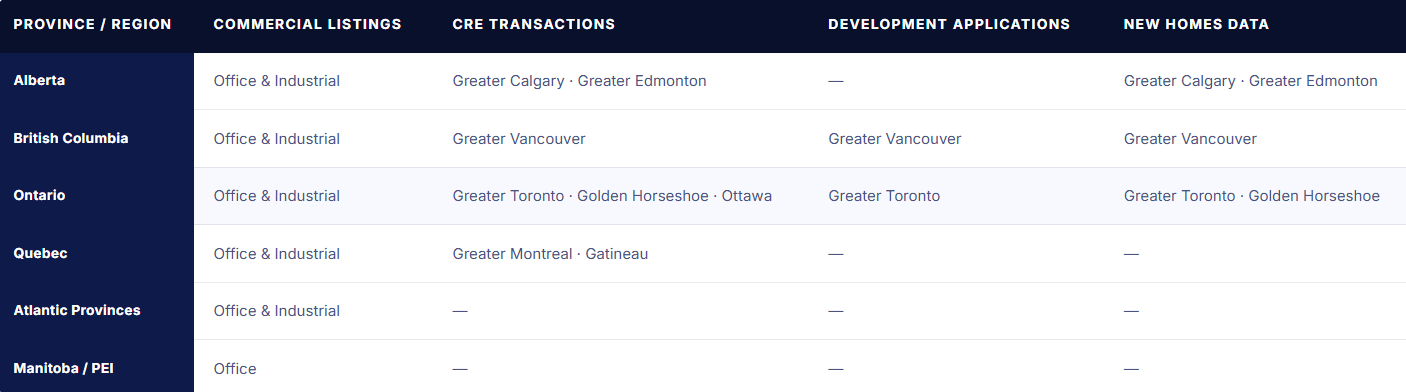
Market coveragE
Coverage across all four catalogs
Availability varies by data type and province. Use this table to assess which catalogs are available for the markets in your research coverage.
What research teams say
Teams that publish with confidence
From organizations already using Altus Data Studio to support their Canadian CRE research.
" Altus Data Studio gives our team the transaction depth we need to advise clients confidently — we're not guessing at market direction, we're showing it with verified data behind every recommendation.

Colliers International
Commercial real estate services, Canada
" Having development pipeline data alongside transaction records in one platform changed how our team approaches market analysis. It's not a nice-to-have anymore.

Barbara Lawlor
President & CEO, Baker Real Estate Incorporated
$45K+
in annual research cost savings reported by customers
180K+
commercial transaction records in the database
50%+
reduction in time spent monitoring market trends
How researchers use it
From search to client-ready in under 20 minutes
A typical comp set preparation session, start to finish.
Select your catalog
Open the relevant catalog for your analysis, transactions for pricing trends, listings for vacancy and absorption, development applications for pipeline monitoring, or new homes for residential supply.
Apply market filters
Filter by market, submarket, product type, and date range. Filters are consistent across catalogs. The same geography structure applies whether you're in transactions or listings.
Analyze trends
Review activity over time. Pricing movement in the transactions catalog, vacancy and absorption in listings, application volume in development applications. Switch between catalogs to layer the picture.
Export for your report
Export the filtered dataset for use in your report, model, or presentation. Data comes out in a structured format, no reformatting before it's usable.
FAQ
Questions researchers ask before booking a demo
These are the questions your sales contact will answer in the first call. Answered here so you can assess whether a demo is worth your time.
How current is the data — is it reliable enough to publish?
Can I run analysis across multiple Canadian markets in one session?
Can I export data to use in external models or reports?
How does this compare to a CoStar subscription for Canadian markets?
Looking for a different use case?
Data Studio is also built for three other teams in Canadian CRE.
See the data for your coverage markets
Book a demo and we'll walk through the catalogs and coverage available for the markets you research.