Altus Data Studio for Brokers
Win the mandate.
Back every pitch.
Brokers save hours of research time by starting with verified data instead of building comps from scratch. Data Studio gives you the depth you need in the markets where deals actually close.
CRE sales and transaction data validated by local market experts, not just scraped from public registry.
Cap rate, price per sq ft, mortgage structure, and stakeholder data in one record.
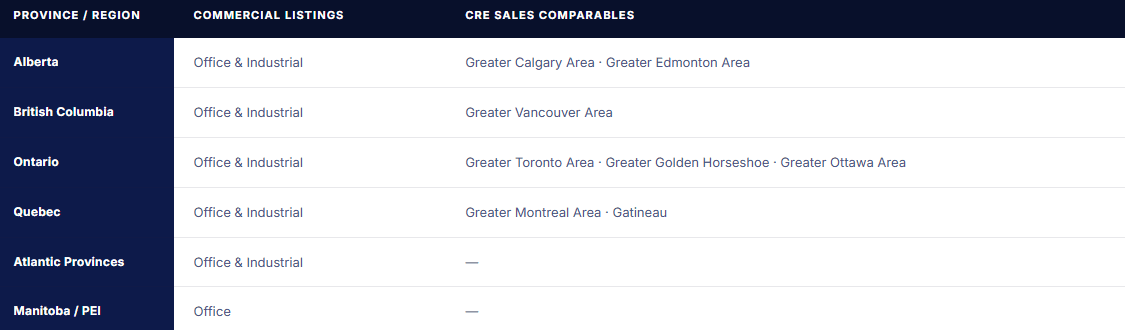
Coverage across the Greater Toronto Area (GTA), Vancouver, Calgary, Edmonton, Greater Golden Horseshoe (GGH), Ottawa, Gatineau, and Montreal.

The problem
Your comps are only as good as your data source
Most brokers in Canada are working from the same incomplete picture. Registry data that's weeks behind, board comps missing key terms, and client-facing materials that can't withstand scrutiny.

Building a comp set takes hours, not minutes
Manual data gathering from multiple sources, cross-referencing registry records, following up with colleagues for deal terms, all before you've written a single line of analysis.

Public records don't tell the full story
Sale price is one thing. Cap rate, financing structure, percentage transferred, and price per sq ft are what actually inform a pricing conversation, and they're rarely in the registry.

Clients are coming to meetings with their own data
Consumer-grade platforms have made property data more accessible. Brokers who can't go deeper than what a client already found are losing the advisory conversation before it starts.
How it helps brokers
Three capabilities that change how you prepare
Each one maps to a specific moment in a broker's workflow, from first research to client presentation.
01
Sales comps with full transaction detail
Transaction records include details like sale price, price per sq ft, cap rate, financing structure, percentage transferred, construction year, and tenancy type. Not just what sold, but the terms that make a transaction analytically useful.
Workflow moment
Pitch preparation and client advisory, building a defensible pricing position backed by verified comparable sales
02
Market absorption rates by submarket
Filter leasing availability and sales volume by submarket, product type, and time period to show clients where the market is moving, and why your pricing recommendation reflects it.
Workflow moment
Market updates and investment advisory, demonstrating knowledge of submarket dynamics your client hasn't seen elsewhere
03
Stakeholder and ownership data
Transaction records can include purchaser and vendor information, and commercial listings records may carry leasing agent and ownership details. Together, they give you visibility into who is active in a market, useful context for prospecting and identifying ownership patterns that signal readiness to transact.
Workflow moment
Prospecting and mandate development, identifying ownership patterns that signal readiness to transact
Inside a transaction record
Every field a broker needs, in one place
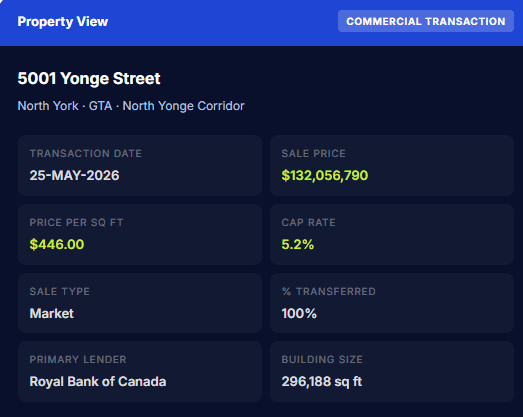
A Data Studio transaction record goes far beyond what's in the public registry. Depending on the record, you may find details like:
Sale price and price per square foot
Cap rate
Financing structure: cash, assumed, vendor-take-back
Primary, secondary, and tertiary lender
Percentage of interest transferred
Purchaser and vendor stakeholder data
Building size, construction year, tenancy type
Sale type, distress type, estate type
Market coveragE
Where your comps data is available
Commercial listings cover all major Canadian provinces. Sales transaction data is available in the markets where verified comp depth matters most.
What brokers say
Firms that changed how they prep for pitches
From brokerages already using Altus Data Studio across Canadian markets.
" Altus Data Studio gives our team the transaction depth we need to advise clients confidently — we're not guessing at market direction, we're showing it with verified data behind every recommendation.

Colliers International
Commercial real estate services, Canada
" The quality of the comps data is what sets it apart. We used to spend hours verifying transactions from other sources — now that verification work is already done, and we trust what we're putting in front of clients.

Barbara Lawlor
President & CEO, Baker Real Estate Incorporated Baker RE
180K+
commercial transaction records in the database
50%+
reduction in time spent monitoring market trends
How brokers use it
From search to client-ready in under 20 minutes
A typical comp set preparation session, start to finish.
Select your market
Open the transactions catalog and choose your submarket, product type, and date range. Filters apply instantly across the full transactions database.
Review verified transactions
Review transaction records with available pricing, financing, and stakeholder detail. Flag the records that are most comparable to your subject property.
Analyze absorption & pricing trends
Switch to the commercial listings catalog to run absorption analysis, track vacancy trends and leasing activity by submarket to demonstrate market support for your pricing recommendation
Export for your presentation
Pull the comp set into your pitch deck or client report. Data formatted for presentation, not just raw output.
FAQ
Questions brokers ask before booking a demo
These are the questions your sales contact will answer in the first call anyway. Answered here so you can decide if a demo is worth your time.
How current is the transaction data?
Can I export comps for client presentations?
How is this different from my board or MLS data?
Do you cover smaller markets outside Toronto and Vancouver?
Looking for a different use case?
Data Studio is also built for three other teams in Canadian CRE.
See the comps for your market
Book a demo and we'll walk through the transaction data available for the specific markets and product types you cover.