Forbury: Transfer Assist
Summary
Transfer Assist is an enhanced workflow for transferring model input assumptions between Forbury users. The new feature allows you to control which input sections and assumptions to exclude from each transfer.
Your input assumptions within excluded sections will not be transferred to the receiver. This provides flexibility on a case-by-case basis to control what assumptions are transferred within the secure and controlled environment.
Key highlights
What's new
Two transfer pathways: Select inputs to exclude by Sheets or Assumptions, depending on your workflow.
Selective input: Choose which input sections and assumptions to exclude, such as: macro forecasts, market rents, detailed valuation assumptions and more.
Transfer notifications: Receive email confirmation when transfers are accepted.
Transfer message notes: Add context via a message field to communicate excluded assumptions or transfer intent.
Excluded formulas: Excluded sections retain their default Forbury formulas in the recipient's model.
What this means for you
For senders: This workflow gives you control by allowing you to exclude certain input assumptions when transferring to the receiver. Provided you've excluded assumptions that impact the model outputs, the receiver's cashflows, valuation, and key metrics will reflect the reduced assumptions and diverge from the outputs displayed in your model.
As a result, the receiver can apply their own assumptions to the relevant sections of the model and continue their workflow. You have the option to communicate what has been excluded via the message box at the time of transfer, if you'd like to include a note for the receiver.
For receivers: Receive transferred data and review the assumptions within the model. You can apply your own assumptions to any sections that were excluded, as well as to other input sections where you would like to use alternative assumptions.
The assumptions excluded in this workflow can vary, we encourage you to check with the sender directly if you require clarification.
For all users: Reduce manual data entry, maintain flexibility and control over assumptions transferred while operating within a secure environment.
For Next Steps
For step-by-step guidance on using Transfer Assist, please refer to the Stonly guide.
Figure 1 - Senders model example – populate model and choose to exclude assumptions on this sheet.
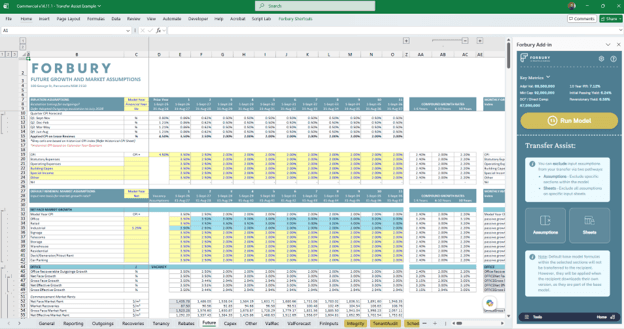
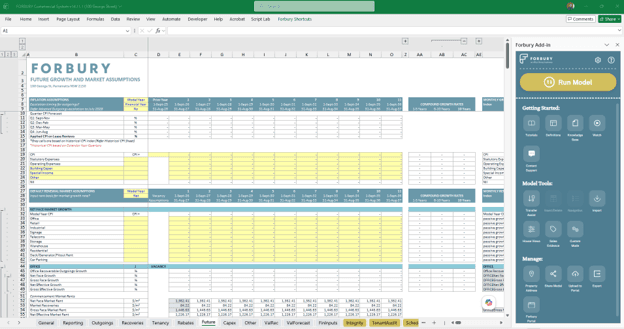
Figure 2 - Receivers model – excluded inputs not carried over, allowing user to incorporate their own assumptions.
Visit the Altus support community
Get technical, software and licence support from the community. Ask questions, give answers, submit suggestions and learn more about your software solutions – with your commercial real estate colleagues.
Product releases